
Digital Twin 2.0 premiere · Live webinar

A spreadsheet shows the average. Simulation shows what happens over time.

A spreadsheet works with average times and says it fits. It won't show queues, machines shared by many orders, or a bottleneck that moves during the week. At the Digital Twin 2.0 premiere we'll show how to test a shop-floor change (layout, robot, new flow) before you make it.

  • Thursday, November 19, 2026
  • 9:00 AM ET · 3:00 PM CET
  • 60 min · 45 + 15 Q&A
  • Free · Online

Webinar starts in:

00days
00hrs
00min
00sec

Prefer Polish? Polish session: Tuesday, November 17, 2026, 10:00 AM CET → register for the PL session

Why a spreadsheet isn't enough

You already have the orders, routings and times, but the result depends on what happens over time. A spreadsheet works with averages, while due dates, WIP and the bottleneck are decided by queues, shared machines and order sequence. You only see that in a simulation of the week.

Example from the demo: one line, two conclusions

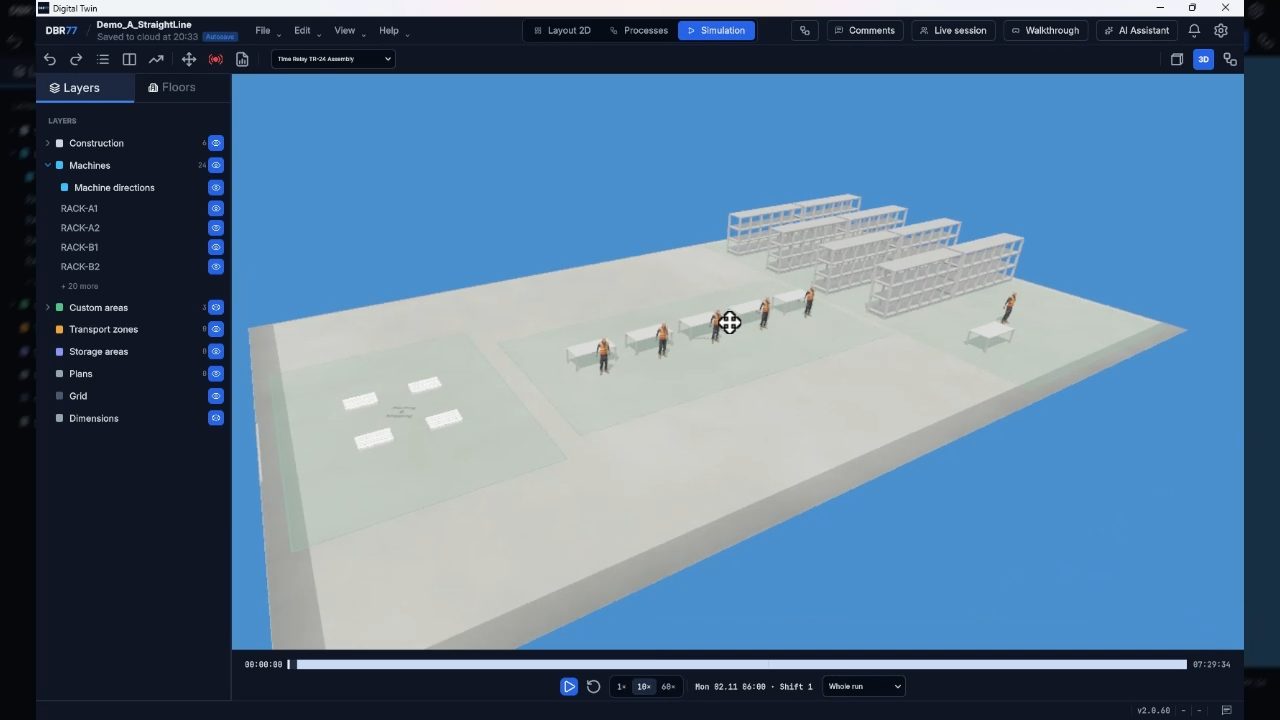
We'll walk through a fragment of a time-relay assembly line. A simple calculation (1,650 units × 74 s at the slowest station, about 34 h against 37.5 h available in a week) says: it fits. Simulating the week shows otherwise: the first order finishes the day after its due date, WIP in the line climbs to about 370 units, and the bottleneck waits for material for more than half its time.

This is a simple line fragment meant to show what the tool can do. It is not a customer project.

Assembly line simulation in DBR77 Digital Twin 2.0

What's new in 2.0

  • From data to model with little preparation. To start you need a layout, stations, routings and nominal times, which you usually already have in your ERP and other systems. You bring them into the model by typing them in or by import.
  • Layout from DWG and DXF with automatic wall creation.
  • Machines, robots, conveyors, carts and people from the library, or your own 3D models (the asset tool imports STEP, FBX, GLB, OBJ, STL and more).
  • AI assistant: built-in, on-prem model, or an MCP connection to your own assistant.
  • VR: switch the session to VR and walk through the planned layout.

What you'll learn

  1. 1

    Why spreadsheets and average times fall short: queues, shared machines and due dates only show up over time.

  2. 2

    What data you already have and how to bring it into the model. Nominal times are enough to start.

  3. 3

    How the simulation shows the bottleneck with its cause and the periods when it limited the line.

  4. 4

    How a change will affect on-time delivery, WIP and lead time.

  5. 5

    How to compare two or three options (layout, robot, autonomous cart, new flow) side by side: throughput, WIP, lead time, on-time delivery and station utilisation.

  6. 6

    How to walk your team and leadership through the change: animation of the shift and a VR walkthrough.

  7. 7

    How to connect ERP and MES. We build integrations individually and agree the scope after analysing your system.

Agenda (60 minutes)

  1. ~5 min

    Why a spreadsheet isn't enough

    The decisions that cost the most, and a practical demo example.

  2. ~15 min

    From data to model

    Layout from DWG/DXF, machines from the library, routings and times, the AI assistant.

  3. ~15 min

    Simulation and the bottleneck over time

    Factory Sim on a sample line: order on-time delivery, WIP, bottleneck and recommendations.

  4. ~10 min

    Comparing options

    Baseline vs. new layout or robot, results side by side.

  5. ~5 min

    How to get started and integrations

    First-model scope, data, ERP/MES, who is needed on your side.

  6. 15 min

    Live Q&A

    Our speakers answer your questions live.

What we'll show on the model

  • Studio 3D: a model built from a library of machines, robots, conveyors, racks, carts and people, with layout import from DWG/DXF.
  • Factory Sim: routings, stations, buffers and transport. Results: throughput, WIP, lead time, order on-time delivery, station utilisation, and the bottleneck with its cause and recommendations.
  • Options: every change runs on a copy of the baseline model, with results side by side.
  • Animation and VR: the shift playing out in 3D and a layout walkthrough in VR.
  • AI assistant: built-in, on-prem, or via MCP.
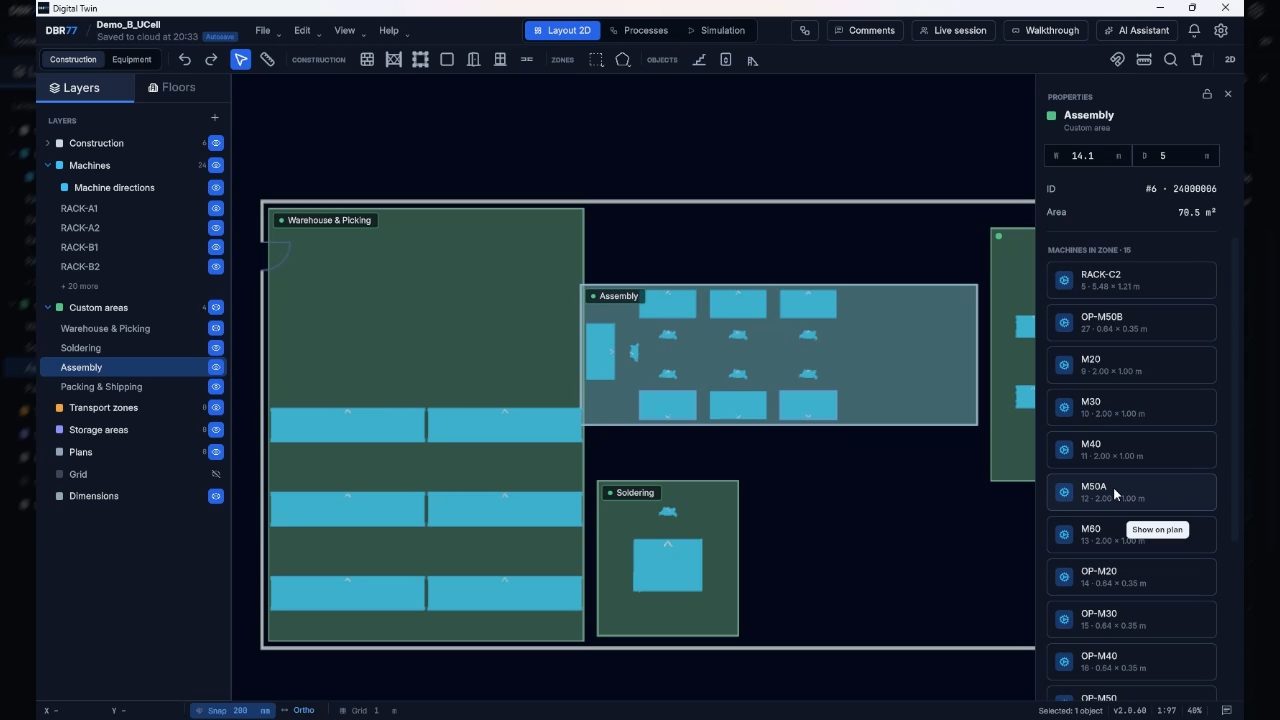
2D shop-floor layout in DBR77 Digital Twin 2.0

Key facts about your data

Your data

In short, what the twin is and what it isn't:

  • The twin doesn't connect to PLCs or robots. It's a decision model, not a control system.
  • AI assistant options: built-in, on-prem model, or an MCP connection to your own assistant.
  • Your team approves every decision.
  • We build ERP/MES integrations individually. The scope is agreed after analysing your system.

Speakers

Justyna Laskowska

Justyna Laskowska

Head of U.S. Market Development, DBR77

Head of U.S. Market Development at DBR77. Former Director of the Centre for Academic Entrepreneurship and Technology Transfer at Nicolaus Copernicus University. She connects manufacturers, integrators and technology partners in Poland and the U.S.

Krzysztof Ćwirko

Krzysztof Ćwirko

Senior Unity Developer, DBR77

Developer who has been building applications in Unity for years. At DBR77 he works on the technical side of the Digital Twin. In the webinar he'll show how a plant model is built and how the simulation runs.

Who is this webinar for?

  • Plant and operations managers
  • Process and lean engineers
  • Capital project planning
  • Intralogistics

Frequently asked questions

Is it live?

Yes, presented live with live Q&A.

When exactly?

Thursday, November 19, 2026, at 9:00 AM ET (3:00 PM CET). You'll get a confirmation with your personal join link, plus reminders one day and one hour before.

How long is it?

60 minutes: a 45-minute presentation and 15 minutes of Q&A.

Will you show a customer project?

This time we walk through a simple line fragment to show what the tool can do. A customer case is planned for the next session.

Will I get the recording?

Yes, every registrant gets it by email after the webinar.

What data do I need for a first model?

A layout drawing (DWG or DXF), your stations and routings, cycle and setup times, and a production plan. You probably already have most of it in your ERP and other systems. Nominal values are fine. Data can be typed into the model or imported.

Can you connect our ERP, MES or other systems?

Yes. We build ERP/MES integrations individually. The scope is agreed after analysing your system.

How does the AI assistant work?

Your choice: our built-in assistant, an on-prem model, or an MCP connection to your own assistant.

How much does it cost?

It depends on the scope of the model. After the webinar you can talk it through with our experts.

What should I prepare?

Nothing is required. If you're facing a specific decision (a new layout, a robot, a new hall), ask about it and we'll address it in the Q&A.

Does signing up commit me to anything?

No.

Save your seat

Fill in the form to get your join link and reminders.

By registering, you agree that DBR77 Robotics may process your data to host the webinar and to contact you about it. Details in our privacy notice.

Thanks for registering!

Zoom will email you a confirmation with your personal join link. Can't find it? Check spam or write to contact@dbr77.com.

Your personal join link comes from Zoom (sender: no-reply@zoom.us). Please check your spam or promotions folder, too.

No link within 15 minutes? Email us: contact@dbr77.com